


Sony Enhances Glasses-Free 3D Spatial Reality Display

Sony Electronics is adding enhancements to support various industries to its ELF-SR2 and ELF-SR1 Spatial Reality Displays, which provide highly realistic, 3D content without special glasses or virtual reality (VR) headsets.
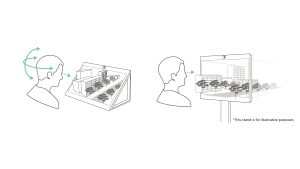
Users can now install the Sony Spatial Reality Display vertically using VESA-compatible monitor stands. The display can also be mounted on walls or embedded vertically into fixtures for exhibition purposes providing enhanced versatility.
The latest release of the Spatial Reality Display Plugin for Preview, designed to improve the compatibility with digital content creation (DCC) tools for showcasing 3D data on spatially immersive displays, enables stereoscopic display of 3D data. It allows for a more accurate assessment of intricate curves, complex structures, and the creation of smooth and natural animations that can be challenging to confirm on 2D monitors.
Expanded Autodesk Maya Compatible Plugin Features
The updated version of the plugin is specifically tailored towards Autodesk Maya, a 3D animation and visual effects software. With Autodesk Maya’s various features, users can experience an even higher level of precision in 3D animation production.
- Real-time Design Review: Experience a direct rendering of the design screen on the Spatial Reality Display in real-time, allowing for immediate design reviews in 3D for quick progress checks and enhance overall production quality.
- Enhanced Control Methods: Intuitive manipulation of the displayed model’s position and orientation can be achieved through various devices such as keyboards, gamepads, Playstation’s DUALSHOCK4 and DualSense, and more. This improvement facilitates easier model verification.
- Direct Display of Maya Scenes: The updated plugin has revamped the 3D drawing process on Spatial Reality Displays, enabling a direct rendering of Maya’s design screen. Maya’s unique object data, which was previously challenging to reflect on Spatial Reality Displays, can now be displayed with precision. This advancement ensures accurate confirmation of complex curves and 3D structures during modeling.
Software Compatibility
In addition to Autodesk Maya, the plugin supports other software such as Autodesk 3dsMax, ZBrush, and Blender, providing a broader range of applications for 3D content creation.
The combination of Sony’s Spatial Reality Displays and the enhanced plugins contribute to higher efficiency and quality improvement in 3DCG production. Users can experience a more intuitive and effective creative process and explore new perspectives during 3D content creation. Different plugins are recommended for the Spatial Reality Displays depending on the software being used:
- Spatial Reality Display Plugin for Preview (ZB) ver1.00 – ZBrush compatible
- Spatial Reality Display Plugin for Preview (3ds) ver1.00 – Autodesk 3dsMax compatible
- Spatial Reality Display Plugin for Preview (BL) ver.1.00 – Blender compatible
- Spatial Reality Display Plugin for Preview for Autodesk Maya ver. 2.00 – Autodesk Maya compatible
Click here to download the plugins.
Sony Spatial Reality Display Player Functionality Update
The Spatial Reality Display Player, an application that provides an effortless display of 3DCG models on Spatial Reality Displays, has received significant updates tailored for exhibitions and presentations with the addition of version 1.1.3 This update introduces features optimized for events, product showcases, and various other scenarios.
- Model Background Setting: Users can now change the background of their models to their liking, thus enhancing immersive spatial visuals, and showcasing the world of the model.
- Demo Function: Multiple 3DCG models can be selected for continuous playback. Users can register multiple patterns, including model backgrounds, lighting, play duration, background music and narration, etc. This enables more effective presentations and exhibitions.
- Background Music (BGM) Functionality: BGM and narration can be added during 3D model playback which facilitates 3D model explanation-even in the absence of a presenter.
In the upcoming version 1.2, scheduled for release in April, the usability of the mouse will be enhanced, allowing for a wider range of actions to be performed.
Download Spatial Reality Display Player here.
SDK Compatibility with OpenXR
With the recent version 2.3.0 update to the Software Development Kit (SDK), Sony’s SDK added compatibility with OpenXR (OpenGL and DirectX12), expanding DirectX11 support. This increased compatibility with existing OpenXR-supported applications widens the range of use cases for Spatial Reality Displays, and developers can enjoy a seamless and efficient application development experience.
For more details, visit the developer site here.
LEARN MORE
Disguise and Nikon Bring Immersive Action to CES 2025
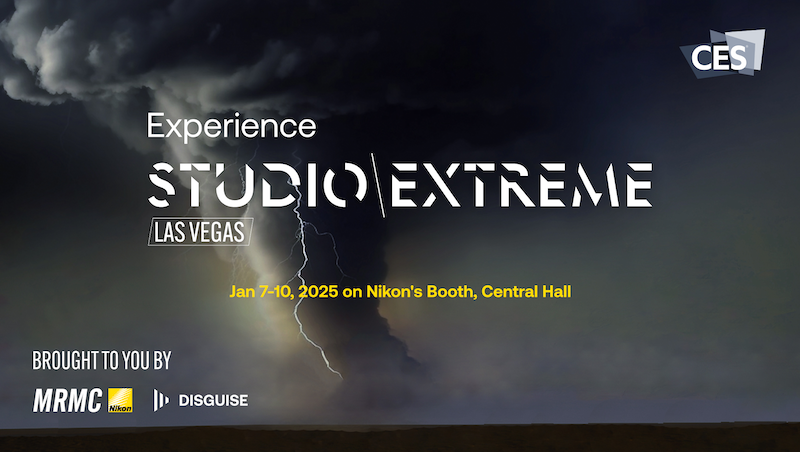
Disguise has partnered with Nikon to unveil a new CES activation that focuses on a can easily create in a turnkey virtual production studio.

Top Tech Gifts for 2024

The community gave their input on the top tech gifts for 2024—and who better to make a tech gift guide than the pros who use tech every day?